InversifyJSを使ってフロントエンドのTypeScriptでDIを実装してみた
クリーンアーキテクチャをTypeScriptで実装する際のDIをInversifyJSを使ってみた
- Firebase & Firestore & Hosting
- Nuxt.js & TypeScript
を使い、サービスを実装する際にクリーンアーキテクチャを採用した。
その際のDIライブラリとしてInverstifyJSを選定
InversifyJS
InversifyJS is a lightweight inversion of control (IoC) container for TypeScript and JavaScript apps.
 Remo H. Jansen
想定サービス
レストランの一覧を取得するもの
Firestore

とりあえず今回はPublicなRestaurantデータを取得するものを作成、
データモデルはこんな感じ
Clean Architecture
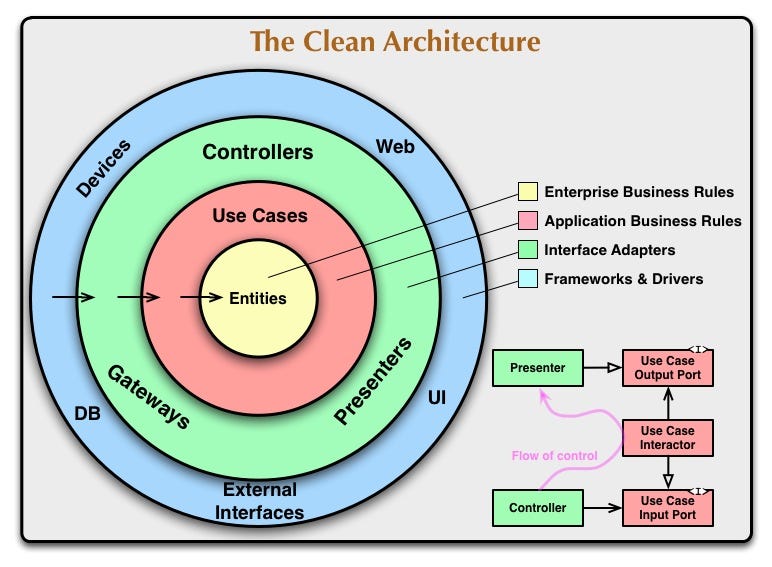
有名な図
これをもとにフロント側を実装
Inverstify JS
GitHub - inversify/InversifyJS: A powerful and lightweight inversion of control container for JavaScript & Node.js apps powered by TypeScript.
A powerful and lightweight inversion of control container for JavaScript & Node.js apps powered by TypeScript. - GitHub - inversify/InversifyJS: A powerful and lightweight inversion of control...
 inversify
InversifyJS is a lightweight inversion of control (IoC) container for TypeScript and JavaScript apps. An IoC container uses a class constructor to identify and inject its dependencies. InversifyJS has a friendly API and encourages the usage of the best OOP and IoC practices.
TS, JSのための軽量なIoCコンテナーである
Install方法は簡単
yarn add inversify reflect-metadata
として ts.config.jsonを下記の様にする
{
  "compilerOptions": {
  "target": "es5",
  "lib": ["es6"],
  "types": ["reflect-metadata"],
  "module": "commonjs",
  "moduleResolution": "node",
  "experimentalDecorators": true,
  "emitDecoratorMetadata": true
  }
}
Code
全コードはここに
Clean Architecture with InversifyJS
Clean Architecture with InversifyJS. GitHub Gist: instantly share code, notes, and snippets.
262588213843476
import { firestore } from 'firebase'
import { injectable, inject, Container } from 'inversify'
import { db } from '@/plugins/firebase'
import 'reflect-metadata'

class RestaurantDataModel {
  constructor(init: any) {
    this.id = init.id || this.id
    this.clientUID = init.clientUID || this.clientUID
    this.content = init.content || this.content
    this.status = init.status || this.status
    this.tags = init.tags || this.tags
    this.name = init.name || this.name
  }
  readonly id: string = ''
  readonly clientUID: string | null = null
  readonly content: string | null = null
  readonly status: string | null = null
  readonly tags: string[] | null = null
  readonly name: string | null = null
}

class RestaurantEntity {
  constructor(init: any) {
    this.id = init.id || this.id
    this.clientUID = init.clientUID || this.clientUID
    this.content = init.content || this.content
    this.status = init.status || this.status
    this.tags = init.tags || this.tags
    this.name = init.name || this.name
  }
  readonly id: string = ''
  readonly clientUID: string | null = null
  readonly content: string | null = null
  readonly status: string | null = null
  readonly tags: string[] | null = null
  readonly name: string | null = null
}

const TYPES = {
  IResutaurantUseCasae: Symbol.for('IResutaurantUseCasae'),
  IRestaurantRepository: Symbol.for('IRestaurantRepository'),
  RestaurantController: Symbol.for('RestaurantController'),
}

interface IResutaurantUseCasae {
  Handle(request: RestaurantGetRequest): Promise<RestaurantEntity[]>
}
class RestaurantGetRequest {
  public tags: string[] = []
  public limit: number = 0
  constructor(tags: string[], limit: number) {
    this.tags = tags
    this.limit = limit
  }
} interface IRestaurantRepository {
  GetByTags(tags: string[], limit: number): Promise<RestaurantEntity[]>
}

@injectable()
class RestaurantRepository implements IRestaurantRepository {
  private readonly db!: firestore.Firestore
  private readonly collectionPath: string = 'public/v1/restaurants'

  constructor(connection: firestore.Firestore = db) {
    this.db = connection
  }

  public async GetByTags(
    tags: string[],
    limit: number
  ): Promise<RestaurantEntity[]> {
    const docs = await this.db.collection(this.collectionPath).limit(limit).get()
    const restaurants: RestaurantEntity[] = []
    docs.forEach((doc) => {
      const restaurant = doc.data()
      const dataModel = new RestaurantDataModel(restaurant)
      restaurants.push(new RestaurantEntity(dataModel))
    })
    return restaurants
  }
}

@injectable()
class RestaurantGetInteractor implements IResutaurantUseCasae {
  private readonly restaurantRepository: IRestaurantRepository
  constructor(
    @inject(TYPES.IRestaurantRepository) restaurantRepository: IRestaurantRepository
  ) {
    this.restaurantRepository = restaurantRepository
  }
  Handle(request: RestaurantGetRequest): Promise<RestaurantEntity[]> {
    const tags = request.tags
    const res = this.restaurantRepository.GetByTags(tags, 1)
    return res
  }
}

@injectable()
class RestaurantController {
  private readonly usecase: IResutaurantUseCasae
  constructor(@inject(TYPES.IResutaurantUseCasae) usecase: IResutaurantUseCasae) {
    this.usecase = usecase
  }
  Get(tags: string[], limit: number) {
    const request = new RestaurantGetRequest(tags, limit)
    const res = this.usecase.Handle(request)
    return res
  }
}

// move inversify.config.ts
const myContainer = new Container()
myContainer
  .bind<IResutaurantUseCasae>(TYPES.IResutaurantUseCasae)
  .to(RestaurantGetInteractor)
myContainer.bind<IRestaurantRepository>(TYPES.IRestaurantRepository).to(RestaurantRepository)
myContainer.bind<RestaurantController>(TYPES.RestaurantController).to(RestaurantController)

const restaurantController = myContainer.get<RestaurantController>(TYPES.RestaurantController)
export { restaurantController }
@injectable() decorator をDIしているClassとInterfaceを実装しているClassへとつけていく
Type
InjectifyJSではruntime時にSymbolを使いそれぞれを識別する方法もある
const TYPES = {
  IResutaurantUseCasae: Symbol.for('IResutaurantUseCasae'),
  IRestaurantRepository: Symbol.for('IRestaurantRepository'),
  RestaurantController: Symbol.for('RestaurantController'),
}
なので今回はこのような方法で実装
Containerの設定
各Interfaceの実装先の設定をしていく
const myContainer = new Container()
myContainer
.bind<IResutaurantUseCasae>(TYPES.IResutaurantUseCasae)
.to(RestaurantGetInteractor)
myContainer
.bind<IRestaurantRepository>(TYPES.IRestaurantRepository).to(RestaurantRepository)
myContainer.bind<RestaurantController>(TYPES.RestaurantController).to(RestaurantController
依存の解決
const restaurantController = myContainer.get<RestaurantController>(TYPES.RestaurantController)
export { restaurantController }
Containerインスタスからgetメソッドを呼ぶことによって依存を解決したインスタンスを返してくれる
注意:
GitHubにもあるように Compotion Root でのみこの処理はしてください
でないと、Sevice locator Anti-Pattern になる可能性がでてきます
このようなライブラリなどを使い、このような設計で構築することにより、テスト可能なロジックをフロントサイドにも書くことができ、中規模・大規模システムもFirestore, Nuxt.jsで対応できるようになるでしょう。
おすすめ本
ドメイン駆動設計入門 ボトムアップでわかる!ドメイン駆動設計の基本 | 成瀬 允宣 | コンピュータ・IT | Kindleストア | Amazon
Amazonで成瀬 允宣のドメイン駆動設計入門 ボトムアップでわかる!ドメイン駆動設計の基本。アマゾンならポイント還元本が多数。一度購入いただいた電子書籍は、KindleおよびFire端末、スマートフォンやタブレットなど、様々な端末でもお楽しみいただけます。

参考&おすすめ記事
実践クリーンアーキテクチャ
2020年5月06日 YouTube追加 2018年9月17日 URL 変更 目次 1. YouTube での解説2. Qiita 版3. はじめに3.1. ソース4. レイヤー4.1. Enterprise Business Rules4
 nrs
nrs