


OpenAPIのサーバーでインテグレーションテストを書く
 Yu Takahashi10 min read
自社のサービスではOpenAPIを使ってサーバーを書いています。
https://swagger.io/specification/
ほぼ全てのエンドポイントに影響のあるリファクタリングをした時に、動作確認が辛すぎたのでインテグレーションテストを書くことにしました。
できたものは以下になります。
 yutakahashi114
以下、簡単に説明を書いていきます。
サンプルアプリケーション
以下のschemaを元にサーバーを実装します。ユーザーの一覧取得、ID指定の取得、登録、更新、削除の5つのエンドポイントがあります。
openapi: 3.0.0
info:
  description: "schema"
  version: "1.0.0"
  title: "integration test"
  contact:
    name: "integration test"
servers:
  - url: "http://localhost:80"
    description: local
tags:
  - name: "user"
    description: ユーザー
security:
  - Bearer: []
paths:
  /user:
    get:
      tags:
        - user
      operationId: FindUsers
      summary: 全ユーザー取得
      description: 全ユーザー取得
      responses:
        200:
          description: OK
          content:
            application/json:
              schema:
                title: Users
                type: array
                items: { $ref: "#/components/schemas/User" }
        500:
          description: Internal Server Error
    post:
      tags:
        - user
      operationId: CreateUser
      summary: ユーザー作成
      description: ユーザー作成
      requestBody:
        content:
          application/json:
            schema:
              $ref: "#/components/schemas/User"
      responses:
        200:
          description: OK
          content:
            application/json:
              schema:
                $ref: "#/components/schemas/ID"
        500:
          description: Internal Server Error
  /user/{id}:
    get:
      tags:
        - user
      operationId: GetUserByID
      summary: 指定したIDのユーザー取得
      description: 指定したIDのユーザー取得
      parameters:
        - in: path
          name: id
          schema:
            type: integer
            format: int64
          required: true
      responses:
        200:
          description: OK
          content:
            application/json:
              schema:
                $ref: "#/components/schemas/User"
        500:
          description: Internal Server Error
    put:
      tags:
        - user
      operationId: UpdateUser
      summary: 指定したIDのユーザー更新
      description: 指定したIDのユーザー更新
      parameters:
        - in: path
          name: id
          schema:
            type: integer
            format: int64
          required: true
      requestBody:
        content:
          application/json:
            schema:
              $ref: "#/components/schemas/User"
      responses:
        200:
          description: OK
        500:
          description: Internal Server Error
    delete:
      tags:
        - user
      operationId: DeleteUser
      summary: 指定したIDのユーザー削除
      description: 指定したIDのユーザー削除
      parameters:
        - in: path
          name: id
          schema:
            type: integer
            format: int64
          required: true
      responses:
        200:
          description: OK
        500:
          description: Internal Server Error

components:
  schemas:
    ID:
      title: ID
      type: object
      properties:
        id:
          type: integer
          format: int64
      required:
        - id
    User:
      title: User
      type: object
      properties:
        id:
          type: integer
          format: int64
          readOnly: true
        name:
          type: string
        email:
          type: string
        created_at:
          type: string
          format: date-time
          readOnly: true
      required:
        - id
        - name
        - email
        - created_at
サーバーの実装は以下になります。サンプルなのでだいぶ雑です。
package main

import (
	"encoding/json"
	"fmt"
	"integration/openapi"
	"log"
	"net/http"
	"os"

	"github.com/go-chi/chi/v5"
	"github.com/go-chi/chi/v5/middleware"
	"github.com/go-chi/render"
	"gorm.io/driver/postgres"
	"gorm.io/gorm"
)

func main() {
	db, err := connectDB()
	if err != nil {
		log.Fatalln(err)
		return
	}
	mux := chi.NewRouter()

	mux.Use(middleware.Logger)

	openapi.HandlerFromMux(Controller{db}, mux)

	port := os.Getenv("PORT")
	if port == "" {
		port = "80"
	}
	http.ListenAndServe(":"+port, mux)
}

type User struct {
	gorm.Model
	Email string `db:"email"`
	Name  string `db:"name"`
}

type Controller struct {
	*gorm.DB
}

func (c Controller) FindUsers(w http.ResponseWriter, r *http.Request) {
	users := []User{}
	err := c.DB.Order("id ASC").Find(&users).Error
	if err != nil {
		log.Println(err)
		w.WriteHeader(http.StatusInternalServerError)
		return
	}
	us := make([]openapi.User, len(users))
	for i, user := range users {
		us[i] = openapi.User{
			Id:        int64(user.ID),
			Name:      user.Name,
			Email:     user.Email,
			CreatedAt: user.CreatedAt,
		}
	}
	render.JSON(w, r, us)
}

func (c Controller) GetUserByID(w http.ResponseWriter, r *http.Request, id int64) {
	user := User{}
	err := c.DB.Where("id = ?", id).First(&user).Error
	if err != nil {
		log.Println(err)
		w.WriteHeader(http.StatusInternalServerError)
		return
	}
	render.JSON(w, r, openapi.User{
		Id:        int64(user.ID),
		Name:      user.Name,
		Email:     user.Email,
		CreatedAt: user.CreatedAt,
	})
}

func (c Controller) CreateUser(w http.ResponseWriter, r *http.Request) {
	u := openapi.User{}
	decoder := json.NewDecoder(r.Body)
	err := decoder.Decode(&u)
	if err != nil {
		log.Println(err)
		w.WriteHeader(http.StatusInternalServerError)
		return
	}
	defer r.Body.Close()

	user := &User{
		Name:  u.Name,
		Email: u.Email,
	}
	err = c.DB.Create(&user).Error
	if err != nil {
		log.Println(err)
		w.WriteHeader(http.StatusInternalServerError)
		return
	}
	render.JSON(w, r, openapi.ID{Id: int64(user.ID)})
}

func (c Controller) UpdateUser(w http.ResponseWriter, r *http.Request, id int64) {
	u := openapi.User{}
	decoder := json.NewDecoder(r.Body)
	err := decoder.Decode(&u)
	if err != nil {
		log.Println(err)
		w.WriteHeader(http.StatusInternalServerError)
		return
	}
	defer r.Body.Close()

	user := &User{
		Name:  u.Name,
		Email: u.Email,
	}
	err = c.DB.Where("id = ?", id).Updates(&user).Error
	if err != nil {
		log.Println(err)
		w.WriteHeader(http.StatusInternalServerError)
		return
	}
	w.WriteHeader(http.StatusOK)
}

func (c Controller) DeleteUser(w http.ResponseWriter, r *http.Request, id int64) {
	err := c.DB.Where("id = ?", id).Delete(&User{}).Error
	if err != nil {
		log.Println(err)
		w.WriteHeader(http.StatusInternalServerError)
		return
	}
	w.WriteHeader(http.StatusOK)
}

func connectDB() (*gorm.DB, error) {
	dsn := fmt.Sprintf("user=%s password=%s dbname=%s host=%s port=%s sslmode=disable",
		os.Getenv("POSTGRES_USER"),
		os.Getenv("POSTGRES_PASSWORD"),
		os.Getenv("POSTGRES_DB_NAME"),
		os.Getenv("POSTGRES_HOST"),
		os.Getenv("POSTGRES_PORT"),
	)
	return gorm.Open(postgres.Open(dsn), &gorm.Config{})
}
DBは以下のテーブルのみになります。
CREATE TABLE users
(
  id         bigserial  NOT NULL,
  name       varchar    NOT NULL,
  email      varchar    NOT NULL,
  created_at timestamp  NOT NULL DEFAULT now(),
  updated_at timestamp  NOT NULL DEFAULT now(),
  deleted_at timestamp,
  PRIMARY KEY (id)
);
準備
通常の開発用のDBとは別にDBを用意する必要があるので、initで作っておきます。
version: "3.7"
services:
  ...

  db:
    image: postgres:11.9
    environment:
      POSTGRES_PASSWORD: develop
      POSTGRES_USER: develop
      POSTGRES_DB: app
    volumes:
      - ./postgres/init:/docker-entrypoint-initdb.d
- ./postgres/data:/var/lib/postgresql/datacreate database test;OpenAPIのからクライアントのコードを生成する必要があるので、Makefileに以下を定義します。
openapigen_i:
	docker-compose exec app oapi-codegen -generate types,client -package openapi -o integration_test/openapi/openapi_gen.go openapi/openapi.yaml
サーバーのコードを以下で生成しているので、クライアントも同じように生成します。
deepmapテストを書く
テストコードは別のmoduleとして置いています。アプリのmoduleにまとめても問題ないと思いますが、アプリの外からの振る舞いをテストするのが目的なので何となく分けました。
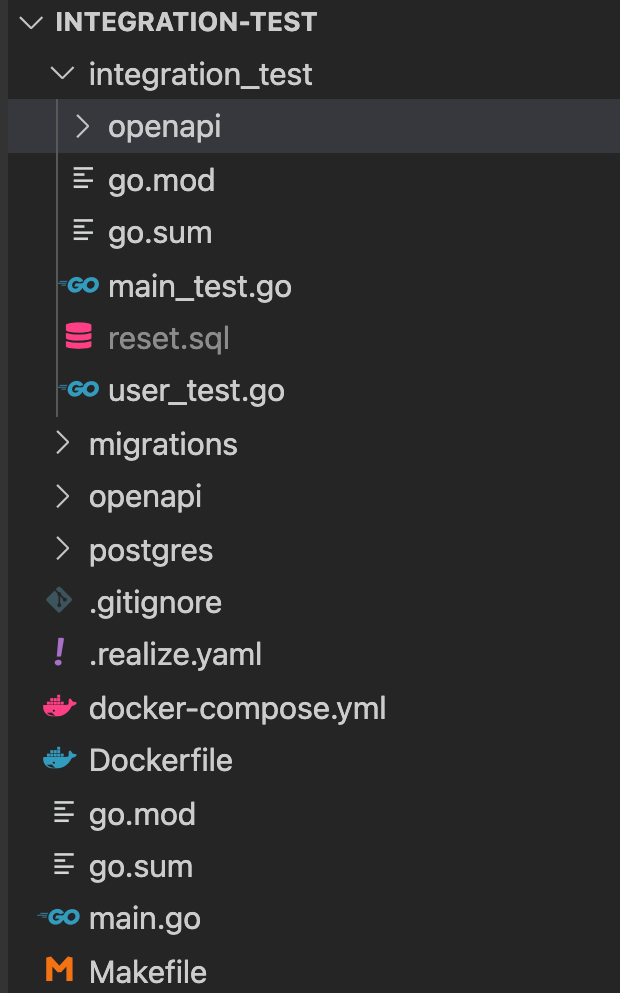
setupとしてmain_test.goに以下を書いておきます。ここでテストサーバーを起動します。テストコード内で起動するのが結構面倒だったので、テストコード内ではなくgo testの前に起動するようにしても良いかもしれません。テストケース内でデータを作ることがあるため、DBのクライアントを用意しています。
var db *gorm.DB
var dsn string

func TestMain(m *testing.M) {
	// ポートやDBの接続先を変えてサーバーを起動する
	os.Chdir("/app")
	cmd := exec.Command("go", "run", "main.go")
	cmd.Env = append(os.Environ(), "PORT=81", "POSTGRES_DB_NAME="+os.Getenv("POSTGRES_TEST_DB_NAME"))
	stdout, _ := cmd.StdoutPipe()
	fatalIf(cmd.Start())
	go func() {
		// 必要ならサーバーのログを出力
		scanner := bufio.NewScanner(stdout)
		for scanner.Scan() {
			line := scanner.Text()
			fmt.Println(line)
		}
	}()
	os.Chdir("/app/integration_test")

	// DBに接続
	connectDB()

	// サーバーの起動が完了するまで待機
	// ヘルスチェックのエンドポイントがあればそれを叩いた方が良い
	time.Sleep(5 * time.Second)

	fmt.Println("============ test start ============")

	// テスト実行
	exitVal := m.Run()

	// サーバーを終了する
	cmd.Process.Kill()
	cmd.Wait()

	os.Exit(exitVal)
}

func connectDB() {
	dsn = fmt.Sprintf("user=%s password=%s dbname=%s host=%s port=%s sslmode=disable",
		os.Getenv("POSTGRES_USER"),
		os.Getenv("POSTGRES_PASSWORD"),
		os.Getenv("POSTGRES_TEST_DB_NAME"),
		os.Getenv("POSTGRES_HOST"),
		os.Getenv("POSTGRES_PORT"),
	)
	var err error
	db, err = gorm.Open(postgres.Open(dsn), &gorm.Config{})
	fatalIf(err)
}

func fatalIf(err error) {
	if err != nil {
		log.Fatalln(err)
	}
}
テストケースは以下のように書きます。レスポンスの型を自動生成できるので、通常のテストと同じように書くことができます。テストの前にDBをリセットし、OpenAPIのクライアントを生成しています。ここではテストケースごとに必要なデータを生成するようにしていますが、全ケース共通の初期データを用意しておいた方が楽な場合もあると思います。また、更新系の判定はDBのデータを参照しても良いかもしれません。
func Test_User(t *testing.T) {
	resetDB()
	client := newClient()
	ctx := context.Background()
	// データ作成
	{
		err := db.Table("users").Create(
			[]map[string]interface{}{
				{"name": "name1", "email": "email1"},
			},
		).Error
		assert.NoError(t, err)
	}
	// ユーザー作成
	{
		res, err := client.CreateUserWithResponse(ctx, openapi.CreateUserJSONRequestBody{Name: "name2", Email: "email2"})
		assert.NoError(t, err)
		assertStatusCode(t, 200, res)
		assertEqual(t, &openapi.ID{Id: 2}, res.JSON200)
	}
	// ユーザー作成
	{
		res, err := client.CreateUserWithResponse(ctx, openapi.CreateUserJSONRequestBody{Name: "name3", Email: "email3"})
		assert.NoError(t, err)
		assertStatusCode(t, 200, res)
		assertEqual(t, &openapi.ID{Id: 3}, res.JSON200)
	}
	// ユーザー一覧取得
	{
		res, err := client.FindUsersWithResponse(ctx)
		assert.NoError(t, err)
		assertStatusCode(t, 200, res)
		want := &[]openapi.User{
			{Id: 1, Name: "name1", Email: "email1"},
			{Id: 2, Name: "name2", Email: "email2"},
			{Id: 3, Name: "name3", Email: "email3"},
		}
		assertEqual(t, want, res.JSON200, cmpopts.IgnoreFields(openapi.User{}, "CreatedAt"))
	}
	// ユーザー取得
	{
		res, err := client.GetUserByIDWithResponse(ctx, 1)
		assert.NoError(t, err)
		assertStatusCode(t, 200, res)
		want := &openapi.User{Id: 1, Name: "name1", Email: "email1"}
		assertEqual(t, want, res.JSON200, cmpopts.IgnoreFields(openapi.User{}, "CreatedAt"))
	}
	// ユーザー更新
	{
		res, err := client.UpdateUserWithResponse(ctx, 1, openapi.UpdateUserJSONRequestBody{Name: "name1_update", Email: "email1_update"})
		assert.NoError(t, err)
		assertStatusCode(t, 200, res)
	}
	// ユーザー取得
	{
		res, err := client.GetUserByIDWithResponse(ctx, 1)
		assert.NoError(t, err)
		assertStatusCode(t, 200, res)
		want := &openapi.User{Id: 1, Name: "name1_update", Email: "email1_update"}
		assertEqual(t, want, res.JSON200, cmpopts.IgnoreFields(openapi.User{}, "CreatedAt"))
	}
	// ユーザー削除
	{
		res, err := client.DeleteUserWithResponse(ctx, 2)
		assert.NoError(t, err)
		assertStatusCode(t, 200, res)
	}
	// ユーザー一覧取得
	{
		res, err := client.FindUsersWithResponse(ctx)
		assert.NoError(t, err)
		assertStatusCode(t, 200, res)
		want := &[]openapi.User{
			{Id: 1, Name: "name1_update", Email: "email1_update"},
			{Id: 3, Name: "name3", Email: "email3"},
		}
		assertEqual(t, want, res.JSON200, cmpopts.IgnoreFields(openapi.User{}, "CreatedAt"))
	}
}

func newClient() *openapi.ClientWithResponses {
	// 認証が必要であればトークンをセットする
	token := ""
	c, err := openapi.NewClientWithResponses("http://localhost:81", openapi.WithRequestEditorFn(
		func(ctx context.Context, req *http.Request) error {
			req.Header.Add("Authorization", "Bearer "+token)
			return nil
		},
	))
	fatalIf(err)
	return c
}

func assertStatusCode(t *testing.T, expect int, actual interface{ StatusCode() int }) bool {
	if expect != actual.StatusCode() {
		assert.Fail(t, "assertStatusCode mismatch", fmt.Sprintf("status code got: %d, want:%d", actual.StatusCode(), expect))
		return false
	}
	return true
}

func assertEqual(t *testing.T, expect, actual interface{}, opts ...cmp.Option) bool {
	if diff := cmp.Diff(actual, expect, opts...); diff != "" {
		assert.Fail(t, "assertEqual mismatch", fmt.Sprintf("differs: (-got +want)\n%s", diff))
		return false
	}
	return true
}
DBのリセット部分です。テスト実行前に生成しておいたリセット用のSQLをpsqlコマンドで実行してます。SQLを生成せず、マイグレーションのdownとupでリセットしても良いかもしれません。
func resetDB() {
	// 原因は不明だがテーブルの作成に失敗することがあるので、最大5回リトライする
	for i := 0; i < 5; i++ {
		out, err := exec.Command("psql", dsn, "-f", "./reset.sql").Output()
		fatalIf(err)
		// 成功したときは4行以上出力される
		if len(strings.Split(string(out), "\n")) >= 4 {
			return
		}
		fmt.Println("retry reset db")
		time.Sleep(1 * time.Second)
	}
	log.Fatalln("failed to reset db")
}
テスト実行前にリセット用のSQLを生成する部分は以下です。
TEST_DB_CONFIG=user=develop dbname=test sslmode=disable password=develop
TRUNCATE_DB_SQL=drop schema public cascade; create schema public;
RESET_SQL_FILE=./integration_test/reset.sql
test_i:
# テーブル全削除のSQL
	echo "${TRUNCATE_DB_SQL}" > ${RESET_SQL_FILE}
# テーブル全削除
	docker-compose exec db psql "${TEST_DB_CONFIG}" -c "${TRUNCATE_DB_SQL}"
# マイグレーション実行
	make test_db_up
# テーブル全削除のSQLにマイグレーション実行後の状態に戻すSQLを追記
	docker-compose exec db pg_dump "${TEST_DB_CONFIG}" >> ${RESET_SQL_FILE}
# テスト実行
	docker-compose exec app sh -c 'cd ./integration_test && go test -parallel=1 ./...'
make test_iを実行すると以下のようになります。
/integration-test$ make test_i
echo "drop schema public cascade; create schema public;" > ./integration_test/reset.sql
docker-compose exec db psql "user=develop dbname=test sslmode=disable password=develop" -c "drop schema public cascade; create schema public;"
NOTICE:  drop cascades to 2 other objects
DETAIL:  drop cascades to table goose_db_version
drop cascades to table users
CREATE SCHEMA
make test_db_up
docker-compose exec app sh -c 'cd /app/migrations && goose postgres "user=develop dbname=test sslmode=disable password=develop host=db" up'
2021/10/02 13:55:56 OK    00001_init.sql
2021/10/02 13:55:56 goose: no migrations to run. current version: 1
docker-compose exec db pg_dump "user=develop dbname=test sslmode=disable password=develop" >> ./integration_test/reset.sql
docker-compose exec app sh -c 'cd ./integration_test && go test -parallel=1 ./...'
ok      integration-test        5.241s
?       integration-test/openapi        [no test files]
エラーがあった場合は以下のように出ます。
/integration-test$ make test_i
echo "drop schema public cascade; create schema public;" > ./integration_test/reset.sql
docker-compose exec db psql "user=develop dbname=test sslmode=disable password=develop" -c "drop schema public cascade; create schema public;"
NOTICE:  drop cascades to 2 other objects
DETAIL:  drop cascades to table goose_db_version
drop cascades to table users
CREATE SCHEMA
make test_db_up
docker-compose exec app sh -c 'cd /app/migrations && goose postgres "user=develop dbname=test sslmode=disable password=develop host=db" up'
2021/10/02 13:57:57 OK    00001_init.sql
2021/10/02 13:57:57 goose: no migrations to run. current version: 1
docker-compose exec db pg_dump "user=develop dbname=test sslmode=disable password=develop" >> ./integration_test/reset.sql
docker-compose exec app sh -c 'cd ./integration_test && go test -parallel=1 ./...'
============ test start ============
2021/10/02 13:58:05 "POST http://localhost:81/user HTTP/1.1" from 127.0.0.1:48510 - 200 9B in 5.2031ms
2021/10/02 13:58:05 "POST http://localhost:81/user HTTP/1.1" from 127.0.0.1:48510 - 200 9B in 1.6208ms
2021/10/02 13:58:05 "GET http://localhost:81/user HTTP/1.1" from 127.0.0.1:48510 - 200 254B in 1.8247ms
2021/10/02 13:58:05 "GET http://localhost:81/user/1 HTTP/1.1" from 127.0.0.1:48510 - 200 84B in 838.7µs
2021/10/02 13:58:05 "PUT http://localhost:81/user/1 HTTP/1.1" from 127.0.0.1:48510 - 200 0B in 2.0287ms
2021/10/02 13:58:05 "GET http://localhost:81/user/1 HTTP/1.1" from 127.0.0.1:48510 - 200 98B in 549.1µs
2021/10/02 13:58:05 "DELETE http://localhost:81/user/2 HTTP/1.1" from 127.0.0.1:48510 - 200 0B in 1.9092ms
2021/10/02 13:58:05 "GET http://localhost:81/user HTTP/1.1" from 127.0.0.1:48510 - 200 184B in 501.1µs
--- FAIL: Test_User (0.22s)
    main_test.go:112:
                Error Trace:    main_test.go:112
                                                        user_test.go:89
                Error:          assertEqual mismatch
                Test:           Test_User
                Messages:       differs: (-got +want)
                                  &[]openapi.User{
                                        {Email: "email1_update", Id: 1, Name: "name1_update"},
                                        {
                                                ... // 1 ignored field
                                -               Email: "email3",
                                +               Email: "email3_fail",
                                                Id:    3,
                                                Name:  "name3",
                                        },
                                  }
FAIL
FAIL    integration-test        5.279s
?       integration-test/openapi        [no test files]
FAIL
make: *** [test_i] Error 1
まとめ
インテグレーションテストを書いたことで、リファクタリングや依存パッケージの更新を心置きなくできるようになりました。書くのは大変でしたが、非常に安心感があって良いです。